
NVIDIA 621.35 Hotfix: SSD Write Bug Fix, Download and RTX 3090 Test
Are new NVIDIA drivers destroying SSDs? Reports of excessive background writes have raised concerns among GeForce users. NVIDIA’s GeForce Hotfix Display Driver 621.35 addresses a background logging issue involving the nvlog.nvlgstg file.
In my video, I check drivers 621.24 and 621.14 on my Dell Alienware OEM GeForce RTX 3090 24GB, then download and install 621.35 Hotfix. Below, you’ll find the download page, instructions for checking your own computer, and what I observed during testing.
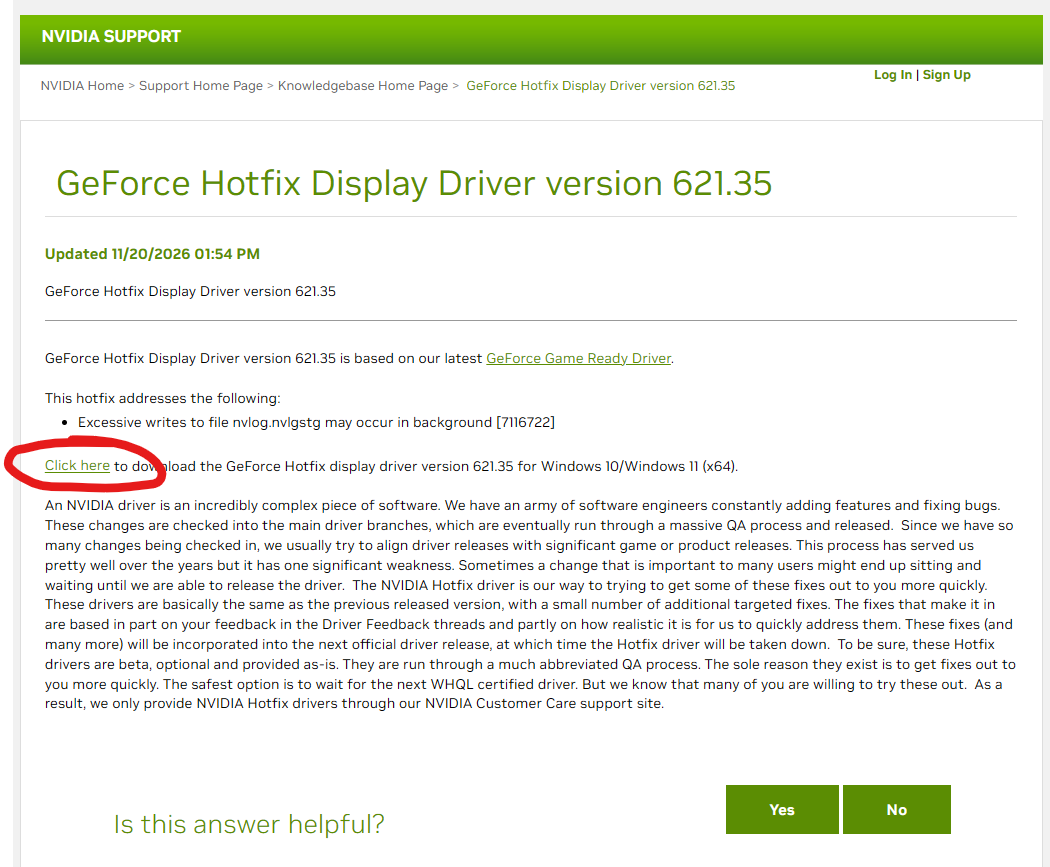
Download NVIDIA 621.35 Hotfix
Use NVIDIA’s Customer Care page to access the hotfix release information and download:
OFFICIAL POST:
Download NVIDIA 621.35 Hotfix from NVIDIA Support
Direct Download Hotfix Display Driver version 621.35Open the page and select its download link. Check the listed operating system and compatibility information before installing.
If you cannot find version 621.35 through the regular driver search or NVIDIA App, use the support page above—the download route demonstrated in my video.
For other driver versions, use NVIDIA’s official driver search.
What is the NVIDIA SSD write bug?
The issue discussed in the video involves repeated background writes associated with NVIDIA Display Container and a file called nvlog.nvlgstg.
Reports involving drivers 621.14 and 621.24 described unusually high write activity while the computer was idle. Some reported figures reached approximately 30GB per hour. Those are reported figures, not a result I measured on my RTX 3090.
The release notes shown in the video identify excessive background writes to that file as the issue addressed by Hotfix 621.35.
Repeated unnecessary writes matter because SSDs have finite write endurance. However, this does not establish that an SSD will fail overnight or within a specific number of months. The effect depends on the drive, its existing wear, the actual write activity, and how long that activity continues.
My RTX 3090 test results
I began with NVIDIA Studio Driver 617.42, then installed the two reported driver versions before trying the hotfix.
| Driver | What I observed |
|---|---|
| Studio 617.42 | No unusual NVIDIA disk activity during the baseline check |
| Game Ready 621.24 | I did not reproduce the excessive writes during the short check |
| Game Ready 621.14 | I did not reproduce the excessive writes during the short check |
| Hotfix 621.35 | The displayed NVIDIA process I/O write counter was approximately 12.5MB during the post-installation check |
The important result: I did not reproduce the reported bug on my system during these short checks.
This means the video demonstrates how to investigate the issue and install the hotfix. It does not demonstrate a confirmed high-write condition disappearing after installation.
A short check immediately after restarting also cannot rule out an issue appearing later during normal use.
How to check NVIDIA background write activity
1. Check your installed driver version
Open the NVIDIA App and look in the Drivers section. Note the installed version before making changes.
2. Enable Task Manager’s I/O counters
- Press Ctrl + Shift + Esc to open Task Manager.
- Open the Details tab.
- Right-click a column heading and select Select columns.
- Enable I/O read bytes and I/O write bytes.
- Find the NVIDIA processes, including NVIDIA Display Container.
- Note the values and check how much they increase over a measured period.
A single number is less useful than the change over time. Record the starting value, ending value and elapsed time.
These are process I/O counters, not a direct measurement of physical SSD wear.
3. Inspect disk activity in Resource Monitor
- Open Start and search for Resource Monitor.
- Select the Disk tab.
- Look for NVIDIA processes generating disk activity.
- Inspect the Write (B/sec) column and associated file paths.
- Check whether sustained writes continue while the computer is otherwise idle.
This helps distinguish NVIDIA-related activity from writes generated by Windows or other applications.
How to install NVIDIA 621.35 Hotfix
- Open the NVIDIA hotfix support page.
- Download the appropriate installer linked on that page.
- Close games and applications using the GPU.
- Run the installer and follow the on-screen instructions.
- Restart the computer after installation.
- Confirm that the installed driver version is 621.35.
- Repeat your disk activity checks, including after a longer period of normal use.
Keep checking your own results rather than assuming that a successful installation alone proves the issue is resolved.
What if I prefer an older driver?
You can use NVIDIA’s driver search to locate an earlier version compatible with your graphics card and Windows installation.
Select your exact GPU and operating system, then review the available releases. A version that worked well on my computer is not a universal guarantee for every system.
Frequently asked questions
Does NVIDIA 621.35 address the SSD write bug?
NVIDIA’s release notes identify excessive background writes to nvlog.nvlgstg as the targeted fix. My video shows its installation, but my short tests did not reproduce the original problem, so they cannot independently confirm the fix on an affected system.
Does a large I/O write counter mean my SSD is damaged?
No. A process I/O counter is not an SSD health report. Investigate the activity over time and inspect the disk operations before drawing conclusions.
Is every computer using 621.14 or 621.24 affected?
My RTX 3090 did not show the reported excessive writes during the checks in the video. Results from one computer cannot establish how every other configuration behaves.
Will this bug destroy my SSD in one or two months?
The video does not establish that. My wording around 01:36 was too strong. Unnecessary writes can contribute to wear, but a specific failure deadline cannot be inferred from these tests.
Have you noticed unusual NVIDIA disk activity? Leave a comment with your GPU, driver version, measurement duration and results before and after updating.
Daniel Marku — Tips2Fix
There is always a way out of every difficulty!
Për videon e Tech Based dhe “Suggested”: arrita të lexoj faqen publike: rreth 846 mijë shikime, 8.8 mijë likes dhe 1,935 komente, me shënimin “1 day ago”. Titulli është “New Windows 11 NVIDIA Drivers Destroy your SSD (Big Problem)”. Këto janë të dhënat e faqes, jo Analytics e tij.
Nga titulli dhe komentet që lexova, interpretimi im është se tema prek drejtpërdrejt frikën e humbjes së pajisjeve të shtrenjta; disa komente flasin pikërisht për pamundësinë për t’i zëvendësuar. Linku është shpërndarë edhe në komunitete lojërash në Steam—provë që po qarkullon jashtë kanalit, megjithëse nuk dimë sa shikime vijnë prej tyre. steamcommunity.com
Pozicionimi yt më i mirë është vazhdimi praktik: “E dëgjove problemin? Ja kontrolli dhe shkarkimi i hotfix-it.” Titulli që zgjodhe dhe thumbnail-i me ✓ e download e komunikojnë këtë. Vendose këtë fjali në fillim të përshkrimit:
Concerned about the NVIDIA SSD write bug? I check drivers 621.14 and 621.24 on my RTX 3090, then show you where to download and how to install the official 621.35 Hotfix.
YouTube thotë se videoja që shikuesi po sheh është sinjali kryesor për sugjerimin e videos pasuese, së bashku me personalizimin. Kopjimi i tags ose emrit të kanalit të tij nuk siguron vendosje pas videos së tij. Për ty, lidhja e temës dhe arsyeja konkrete për të parë hapin tjetër janë drejtimi më i arsyeshëm. YouTube Help
